
How To Label Freight Correctly
A practical guide to labels: what to include on them, where to place them, and why they matter
Shipping labels are one of the primary on-freight identifiers used in terminals, and at pickup and delivery. They help drivers and dock teams identify your freight, match each handling unit to the right paperwork, and keep multi-piece shipments from getting separated.
Labels tie each pallet, crate, or carton to the shipment identifiers on the BOL, so that pieces are easier to scan, sort, and track through the network.
If your labels are missing, unreadable, or don’t match the Bill of Lading (BOL), your shipment is more likely to be delayed, rehandled, or treated as unidentified freight (or freight pending identification) until someone can confirm what it is and where it’s going.
In this article, you’ll learn what to include on a freight label, what must match the BOL, and where to place labels so they stay readable and scannable from pickup to delivery.
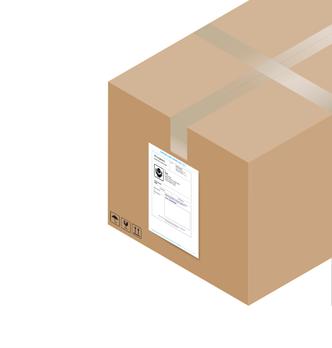
What a freight shipping label should include
When you book your shipment on Freightera, labels are automatically generated for you. If you’re creating labels yourself, below are some helpful tips.
At a minimum, each label should clearly show shipment identifiers in readable text and (ideally) a scannable barcode.
Include as much of the following as you can (consistent with what’s on the BOL):
- Shipper name and pickup city/state/province
- Consignee name and delivery city/state/province
- Ship-to address (and company contact, if applicable)
- Reference number(s) used to match paperwork (for example, the BOL number, the PO number, or the internal order reference)
- Piece count marker for multi-piece shipments (for example, “1 of 3”, “2 of 3”, “3 of 3”)
Where to place freight labels so they stay readable and scannable
Label placement matters because freight gets moved, stacked, shrink-wrapped, and scanned at multiple points.
- Place labels on a flat, clean, dry surface where tape will stick and the barcode won’t wrinkle.
- Avoid placing labels too low where forks can scrape them.
- Place labels on all four sides, and the top, whenever possible.
- Avoid placing labels across edges, corners, or banding, where the barcode is more likely to bend or tear during handling.
- If you shrink-wrap, make sure the label is not distorted by the wrap and remains clearly readable.
Label every handling unit, not just the lead pallet
Freight shipments often include multiple pieces. Each piece needs its own label so it can be sorted correctly.
If you’re shipping multiple pallets in the same shipment, use a clear sequence such as “1 of X” to reduce the risk of partial delivery or missing pallets. Make sure to label each pallet, crate, or carton that will be handled as an individual unit.
Print quality and barcode scannability
Good placement won’t help if the label can’t be scanned or read reliably. Here are some tips on how to keep labels crisp, durable, and easy to scan throughout transit:
- Use printed labels when possible (clear, high-contrast text and barcodes reduce misreads).
- Avoid barcodes that are too small, stretched, or low-resolution.
- Avoid covering barcodes with glossy tape that can create glare and reduce scan reliability.
- Use label stock and adhesive that can handle real freight conditions (e.g. cold, dust, friction, handling).
Freight shipping label FAQ
Do I need shipping labels if I already have a Bill of Lading (BOL)?
Yes. The BOL is the main document for freight shipping, but labels are what make each handling unit easy to identify and route while it moves through terminals.
Do I need one label per pallet, or can I label just the first pallet?
You should label every handling unit. If you ship multiple pallets, each pallet needs its own label. Ideally, label each pallet on at least two sides and the top. For best results, place labels on all four sides of each pallet.
Where do I put a shipping label on a pallet?
On at least two, and preferably on all four sides, and on the top.
Can I handwrite freight labels?
You can, but printed labels with clear text (and ideally barcodes) are more reliable for terminal handling and scanning. On Freightera, your labels are automatically generated for you. All you need to do is print them out and put them on your freight.
What should I do right before pickup to avoid label issues?
Do a quick walk-around and confirm: every piece is labelled, labels face outward, and the key identifiers match the BOL. Taking a quick photo of labelled pallets before pickup can also help in case of any disputes.